Showing posts with label Adobe Photoshop. Show all posts

11 May 2016

Learning to the Max!

If I want to fulfill my ambition of becoming a game designer, at some point I'll need to buckle down and learn 3ds Max. Today, I made the most of Digital Tutors by spending most of my afternoon powering through a tutorial on the basics of the software.


The process begun with the creation of a spline, which was then turned into a piece of 3D geometry. The fillet tool was used on some of the sharper corners to make them desirably rounder. These elements were then duplicated and attached with the bridge tool.


Separate polygon shapes were created, modified and positioned to represent the buttons and joystick. The screen face was duplicated and hidden, before a more shapely screen was put in place. 


The duplicated object was unhidden and positioned to act as a piece of glass - which would later be altered with mental ray materials. 


At this stage, the UV unwrapping could begin. All of the processes so far have been fairly similar to that of Autodesk Maya, so it hasn't been too difficult to follow through. I had so far followed the tutorial very closely, so I decided to use the texturing stage as a chance to make the model my own. As 'Spyro the Dragon' is my childhood favourite, I chose an array of images to use in my Photoshop file.
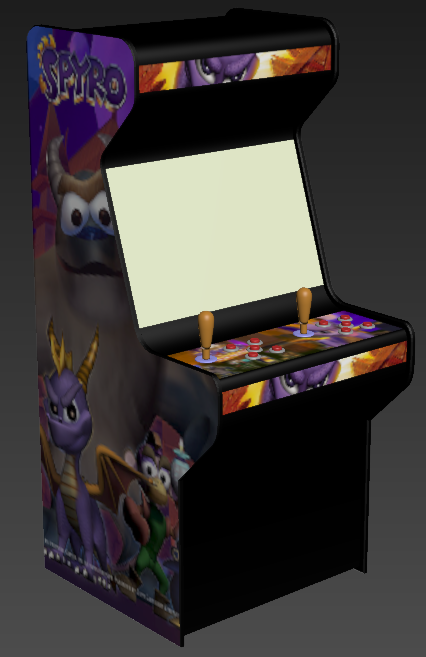


Using the material editor, I created several different plastics for the buttons, joysticks and rims which were individually altered to be either matte or glossy with varying colours. The backplate was input into the settings for the initial render:


I was pretty happy with the progress at this stage, but there were still changes that needed to be made. To begin with, the output ratio for the render was set to 1280x720 and use of the safeframes allowed me to reposition the object to fill the frame.

A skylight was created with a HDR spherical map input to gain better control of the scene's lighting. However, this was still very dark, so the lighting was ramped. A polygon plane was inserted to act as the ground, allowing a shadow to be placed.


I'm feeling pretty happy about my progress so far, so I am aiming to work towards building my knowledge every day through the use of Digital Tutors and YouTube tutorials until I feel comfortable enough to try my own projects.

25 February 2015

Photoshop Experimentation


Above is the original photograph. Nothing too interesting. In fact, the image itself is boring to look at. The goal is to modify the image in Photoshop to create a more interesting scene. I figured that removing the lamp post would be a good place to begin since it blocks out the background. 


I decided to change the atmosphere of the scene, which required me to alter the lighting and colour of the image. I found the castle background on Google images but feel the the progress so far works for a rough Photoshop test.

23 January 2015

Remy in Full Colour

The textured UV snapshot.
Texturing the model proved to be very time consuming but completing the task left me with a feeling of accomplishment. I had many errors with rendering the textures with mental ray - many of which quickly resulted in a navy blue screen. I overcome this by exporting the texture file as multiple different image formats and found that bitmap solved the problem.


26 November 2014

Real to the Surreal: Study

Surrealism is an open art form which allows artists to portray aspects of reality and their imagination in absurd styles. Before starting the 'Real to the Surreal' art project, I decided to research professional artists. 

Aziz and Cucher are visual artists who have collaborated since 1993 to create a range of surrealist projects. Dystopia is their most renowned exhibit, which features photographs of various models with their facial features removed. 


To me, this project is visually powerful - making such a small change can leave a large and negative impression on the audience; when showing their work to my family, they described the images as "gross" and "creepy". I decided to create a piece of work in their style in an attempt to spark a similar reaction. 


My interpretation of Aziz and Cucher's style.
I decided to use a younger model as this would allow me to combine surrealism and a child's innocence to create a (potentially) bigger impact. To further emphasise this, I asked him to lean against a fluffy surface in his school uniform - similar to a standard school photograph. I then took the image into Adobe Photoshop, where I removed his facial features and drained the saturation. The lighting on various areas of the face is patchy and needs tweaking, but I will leave it for now so that I can make a start on the relevant art project.